
When onboarding a new supplier, verifying their business details is an important part of maintaining accurate financial records and ensuring proper VAT compliance.
One simple but often overlooked step is TRN verification. This can be done through the Federal Tax Authority portal.
A Tax Registration Number is issued by the FTA to businesses registered for VAT. Before processing a supplier’s first tax invoice, check their TRN to verify that it corresponds to the correct registered business. Which helps ensuring accurate supplier records when adding them to your accounting system.
Why Should You Verify a Supplier’s TRN?
As part of your supplier verification process, TRN verification helps confirm the registered business name and identify discrepancies in invoice details.
It also strengthens supplier due diligence and supports accurate VAT records and input tax recovery.
While it does not replace reviewing the supplier’s trade licence or VAT registration certificate it adds an extra layer of verification.
How to Verify a TRN on the FTA Portal (Step by Step Process)
The Federal Tax Authority provides a TRN/TIN Verification facility on its official website. Follow these simple steps to verify TRN:
Step 1: Visit the official FTA website
Go to the Federal Tax Authority (FTA) website.
Step 2: Locate the TRN Verification tool
Look for the side panel on the FTA homepage and click on the TRN option.
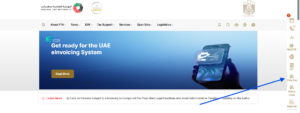
Step 3: Enter the supplier’s TRN
Enter the supplier’s 15 digit TRN or TIN in the relevant field.
Make sure you enter the number correctly to avoid any errors during verification.
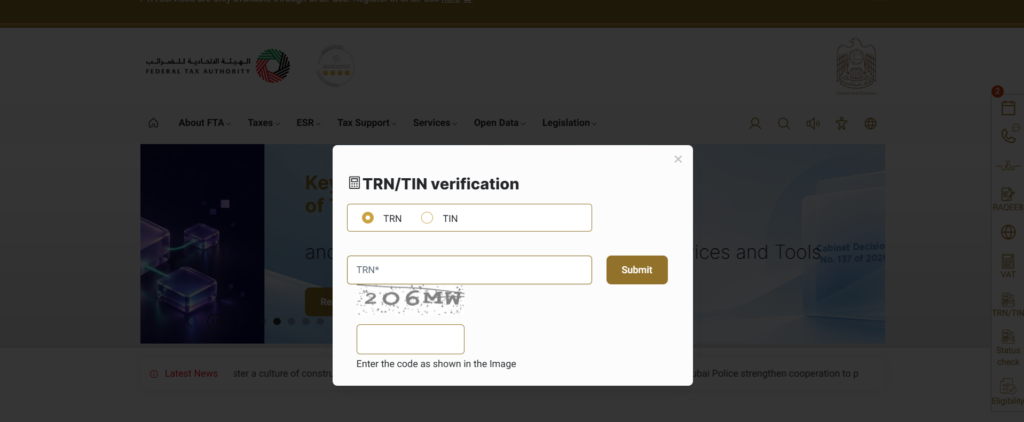
Step 4: Review the verification result
Once you enter the TRN/TIN, the system will display the registered name of the company or person associated with that number.
Step 5: Confirm the supplier’s details
Compare the registered business name displayed on the FTA portal with the supplier’s name on their tax invoice and supporting documents.
This helps you verify that the TRN belongs to the correct supplier and that the business name is associated with the number provided.
If the details do not match, contact the supplier and request clarification before proceeding with the transaction.
Make TRN Verification Part of Your Supplier Onboarding Process
When you start working with a new supplier, checking their TRN might seem like a small administrative task. But it’s worth doing before you add their details to your accounting records.
A quick check on the FTA portal can help you confirm their VAT registration details and spot any errors early.
Making this a regular part of supplier onboarding can save your finance team time and help avoid unnecessary back and forth later.
It only takes a few minutes to verify a TRN, but it can save you a lot of trouble down the line.
Frequently Asked Questions
1. What is a TRN in the UAE?
A Tax Registration Number is a 15 digit number issued by the UAE Federal Tax Authority to businesses registered for VAT. It helps identify a business for VAT related transactions.
2. Where can I verify a supplier’s TRN?
You can verify a supplier’s TRN using the TRN/TIN Verification tool on the official FTA website: https://tax.gov.ae/en/
3. How do I verify a TRN on the FTA portal?
Visit the FTA website, open the TRN/TIN Verification tool, enter the supplier’s 15 digit TRN, complete the CAPTCHA and click Submit. The portal will display the verification result.
4. What should I do if the supplier’s TRN details do not match the invoice?
Contact the supplier and ask them to clarify the discrepancy. Check their VAT registration certificate and other supporting documents before updating your accounting records or processing the invoice.
5. Should I verify a supplier’s TRN before processing their first invoice?
Yes. It’s good practice to verify the TRN when onboarding a new supplier, preferably before processing their first tax invoice. This helps you identify errors early and maintain accurate VAT records.
6. Does TRN verification confirm that an invoice is valid for VAT recovery?
Not on its own. TRN verification confirms the registration details available through the FTA tool. You should also check that the invoice meets the UAE VAT requirements and that the purchase qualifies for input tax recovery.